Operational technology (OT) is the collection of systems that monitor and control physical processes. In a plant, the architecture is the map that shows how those systems are arranged, what each component does, and how information and commands move between them.
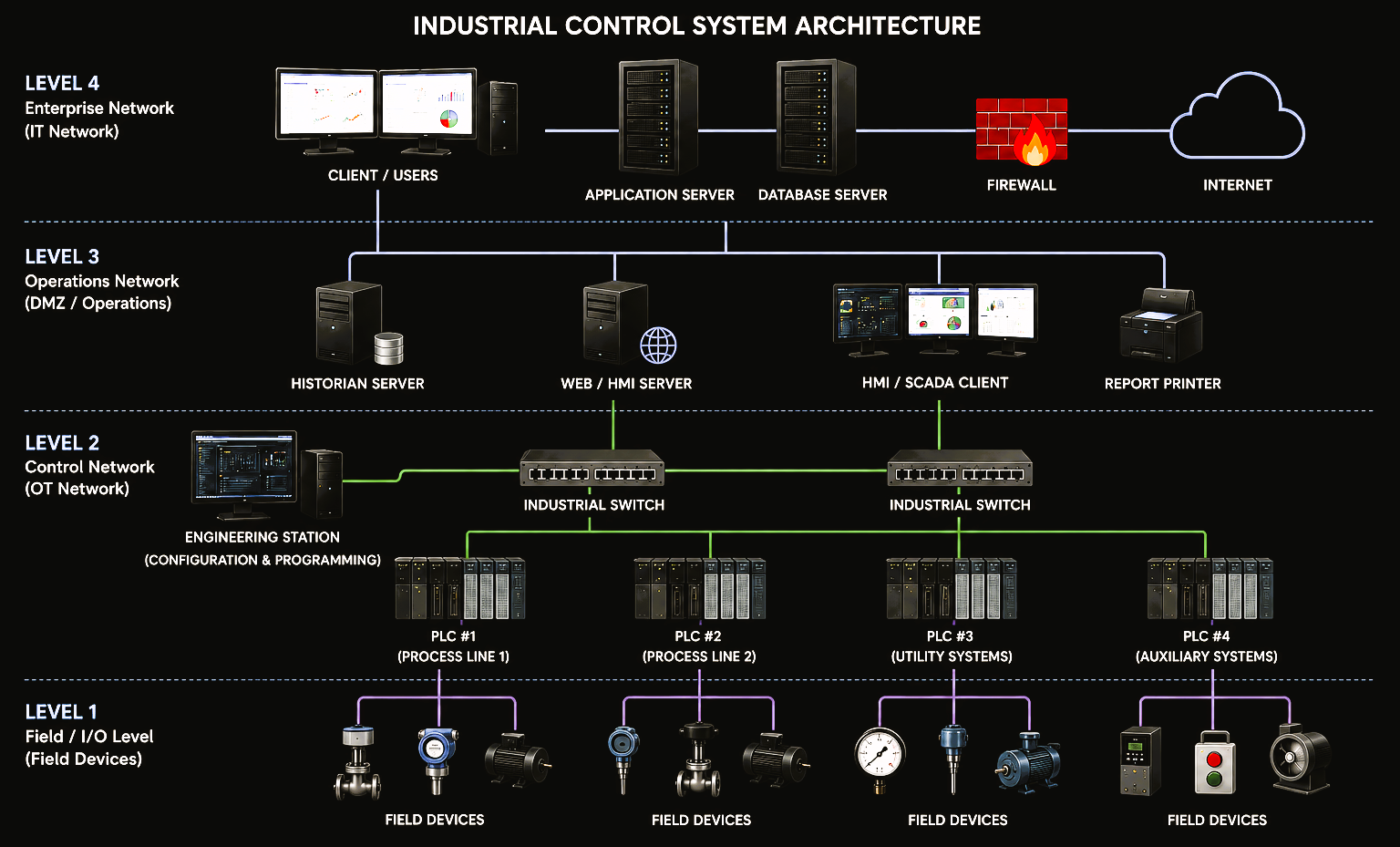
Typical layered industrial control system architecture. Actual plant implementations vary according to process, platform, availability requirements and site standards.
The layers of an OT architecture
A plant is easier to understand when the architecture is separated into functional levels. The Purdue / ISA-95 style hierarchy is a useful reference because it gives engineering, operations and IT teams a common language for describing where functions sit and how the layers should interact.
ERP, reporting, business applications and enterprise services.
Historians, application servers, data services and controlled interfaces to enterprise systems.
SCADA/HMI servers and clients, engineering workstations and operator stations.
PLCs, remote I/O, local controllers and control network infrastructure.
Sensors, actuators, valves, motors, drives and field instruments.
The layered model is a reference, not a requirement that every plant must look exactly the same. Legacy equipment, packaged systems, safety systems and vendor architectures often introduce variations.
PLCs and remote I/O
The programmable logic controller is where deterministic control logic meets the physical process. It reads inputs, evaluates the programmed logic and writes outputs.
- Inputs can come from pushbuttons, switches, protection devices and process transmitters.
- Outputs can operate contactors, solenoids, valves, VSD commands and other final control elements.
- PLCs execute permissives, interlocks, sequences, PID loops, equipment starts and stops, and alarm logic.
- Remote I/O places input and output modules closer to the process instead of routing every field cable back to the controller panel.
Why PLC placement matters
Controllers normally sit on the OT control network close to the process area they control. Their communications should be intentional and documented because a PLC may exchange data with SCADA, peer controllers, drives, gateways, remote I/O and engineering software.
SCADA, HMI and operator stations
SCADA and HMI systems provide supervision. They collect data from controllers and present it in a form operators can understand and interact with.
- Process graphics and equipment status.
- Alarm presentation and acknowledgement.
- Historical and real-time trends.
- Approved operator commands and setpoints.
- Production, diagnostic and maintenance information.
Operator station
The day-to-day plant interface. It can be a dedicated workstation, thin client, browser client or platform-specific runtime client.
SCADA server / gateway
Typically manages device communications, tags, alarms, scripts, users, projects, data connections and client sessions.
The operator workstation should not automatically have the same privileges as the engineering environment. Operations needs controlled plant interaction; engineering access can modify the control system itself.
The engineering station
The engineering station is used by authorised technical personnel to configure, diagnose and maintain the control system. Because it can change running plant systems, it should be treated as a high-value OT asset.
- PLC programming and online diagnostics.
- SCADA/HMI development and deployment.
- Drive and industrial communications configuration.
- Backup, restore and version verification.
- Commissioning, loop testing and fault finding.
- Controlled storage of engineering projects and configuration files.
Configure & maintain
Programming and design tools, restricted technical access and the ability to modify control-system projects.
Operate & monitor
Runtime/client software, role-based operational access and approved plant commands rather than engineering changes.
Industrial networks and communications
The industrial network is the path that allows controllers, servers, workstations and intelligent field equipment to exchange data. Modern plants commonly use several protocols at the same time.
- Industrial Ethernet: PROFINET, EtherNet/IP and Modbus TCP.
- Fieldbus / serial: PROFIBUS DP, Modbus RTU and vendor-specific networks.
- Application data exchange: protocols such as OPC UA can connect higher-level applications and platforms.
- Infrastructure: managed switches, firewalls, gateways and protocol converters create the communication paths.
A useful network architecture should answer
- Which devices are connected and where are they located?
- What addresses, device names and network segments are assigned?
- Which protocols and ports are required?
- Which switches, gateways, converters and firewalls are in the communication path?
- Which communications are essential to control and which are only needed for reporting?
Historian and database
The control system needs current values to operate. Historians and databases preserve information so the plant can analyse what happened over time.
Historian
Stores time-stamped process values such as pressures, levels, flows, motor states, setpoints and production values for trends, analysis and investigation.
Database
May store application data, reports, configuration, production records or historian data depending on the SCADA platform and system design.
Backup is part of the architecture
A server shown on a drawing is only part of the recovery picture. The architecture should also establish where backups reside, what must be backed up, the software versions and licences required, who has access, and how restoration is verified.
How data and commands flow
A useful system architecture explains direction, purpose and dependency — not just cables. Plant data typically moves upward for visibility and analysis, while authorised commands move down toward the process.
Pressure transmitter → remote I/O → PLC → SCADA → historian → report or business application.
Operator station → SCADA/HMI service → PLC logic → output → VSD, actuator or controlled equipment.
Think in dependencies
- If SCADA becomes unavailable, can the PLC continue controlling the process safely?
- If the historian stops, does production stop or only historical reporting?
- If a network switch fails, which controllers, clients or devices lose communication?
- If the engineering station is offline, can the plant still be operated?
Security, segmentation and remote access
OT cybersecurity needs to protect availability, integrity and safe plant operation while still allowing legitimate engineering, operations and support activities.
- Separate enterprise IT and control networks using appropriate segmentation and firewalls.
- Use controlled intermediary services or an industrial DMZ when IT-to-OT data exchange is required.
- Restrict remote access to approved paths, users and systems.
- Apply least privilege to engineering, server and operator accounts.
- Maintain current asset inventories, architecture drawings, backups and configuration baselines.
- Remove unnecessary connectivity and services where practical and supported by the equipment.
Network zones, conduits, remote-access paths, server roles and trust relationships are architectural decisions. They should be understood and documented before they become troubleshooting or security problems.
Documenting your own OT architecture
Start with what actually exists in the plant, validate it against live equipment and then add the information required for ongoing operations, troubleshooting and change.
- Identify servers, workstations, PLCs, remote I/O, HMIs, switches, gateways, drives and major intelligent devices.
- Record device names, network addresses, software versions and physical locations.
- Show communication links and label protocols where they are known.
- Separate functional zones such as enterprise, operations, supervisory, controller and field layers.
- Document historian/database dependencies, backups and restore responsibilities.
- Mark remote-access paths, firewalls and external connections.
- Update the architecture after approved changes.
A good OT architecture is more than a network diagram. It is a shared engineering reference showing how the plant is controlled, supervised, maintained, connected, protected and recovered.